
There was a moment earlier this year when I looked at my screen and realized something ridiculous.
I had 27 browser tabs open.
One tab was for writing.
Another was for research.
Three were for client work.
A couple were for invoices.
Several were tools I had signed up for because some YouTube creator promised they would “change everything.”
The funny part?
I was supposedly using AI to become more productive.
Instead, I was spending half my day jumping between apps.
That was the day I decided to rebuild my entire workflow from scratch.
Not with more AI tools.
With fewer.
After months of testing, canceling subscriptions, making mistakes, and rebuilding systems, I ended up with a lean AI productivity stack that genuinely helps me get more done as a solopreneur.
This isn’t a list of every AI tool on the market.
It’s the stack I would recommend to a friend who runs a one person business and wants to save time without drowning in software.
Let’s get into it.
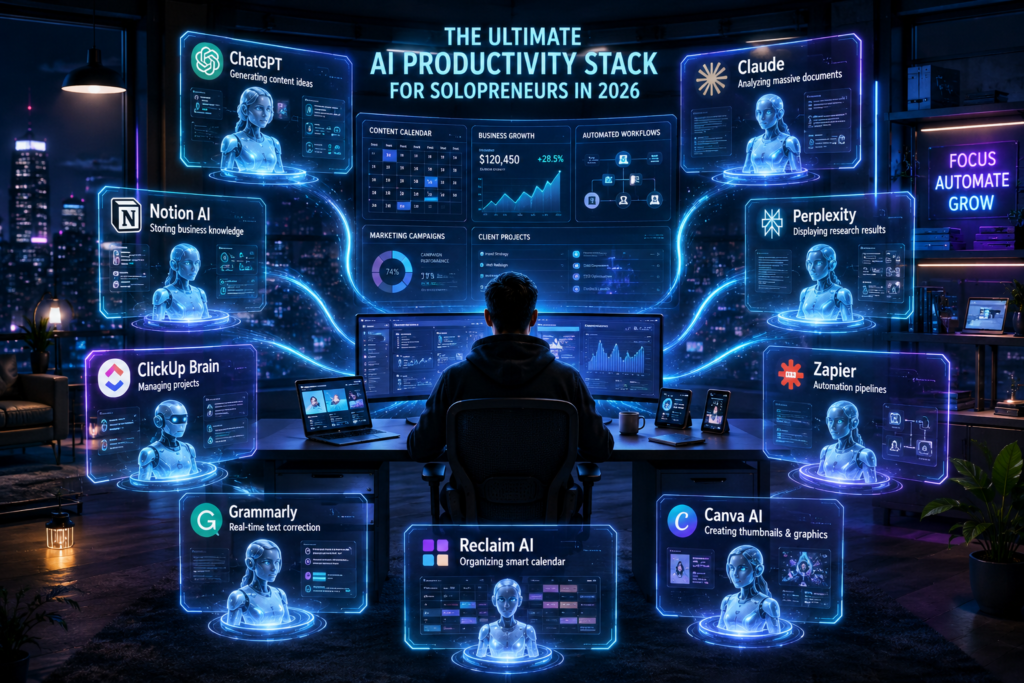
Why Most Solopreneurs Are Using AI Wrong
One mistake I see everywhere is people trying to find a single AI tool that does everything.
That doesn’t exist.
Even the most powerful AI assistants have strengths and weaknesses.
Some are amazing at writing.
Some are incredible at research.
Others shine when connected to your projects, documents, and workflows. Community discussions and productivity experts increasingly recommend building a small stack of specialized tools rather than relying on one tool for everything. (Reddit)
When I first started experimenting with AI, I thought more tools meant more productivity.
Wrong.
More tools usually create more complexity.
The goal isn’t to collect software.
The goal is to create a system.
The AI Productivity Stack I Actually Use
Think of your productivity stack like a business operating system.
Every tool should have one clear job.
Here’s the setup.
Layer 1: Your Thinking Partner
ChatGPT
If I could keep only one AI tool, this would probably be it.
Not because it’s perfect.
Because it’s flexible.
I use it for:
- Brainstorming offers
- Planning content calendars
- Drafting emails
- Creating SOPs
- Marketing ideas
- Research summaries
- Strategy sessions
One thing that changed my workflow dramatically in 2026 was treating AI like a team member instead of a search engine.
Instead of asking:
“Write a blog post.”
I started saying:
“Act as my content strategist. Ask me questions before writing.”
The outputs became significantly better.
Recent productivity rankings still place ChatGPT among the strongest all purpose AI assistants available for business owners. (ClickUp)
Layer 2: Long Form Thinking and Deep Writing
Claude
Many people ask:
“Why use Claude if you already have ChatGPT?”
Fair question.
For me, Claude shines when documents get large.
I regularly feed it:
- Business plans
- Long client briefs
- Research reports
- Website audits
- Strategy documents
The writing often feels more natural and polished, especially for longer content. Claude has also expanded its workplace integrations, allowing direct interactions with tools like Slack and Figma from within the chat experience. (TalentedAtAI)
I don’t use Claude every hour.
But when I need deep work, it becomes incredibly valuable.
Layer 3: The Second Brain
Notion AI
For years, my notes were scattered everywhere.
Google Docs.
Random text files.
Phone notes.
Bookmarks.
Screenshots.
Chaos.
Then I moved everything into Notion.
Today, Notion stores:
- Business plans
- Client information
- Content ideas
- SOPs
- Meeting notes
- Research
- Goals
The AI features make it even better.
I can ask questions about old notes.
Generate summaries.
Create outlines.
Find information buried inside hundreds of pages.
Many 2026 productivity reviews consider Notion one of the strongest all in one AI workspaces because it combines documents, databases, project management, and AI assistance in one place. (TheToolChief)
Layer 4: Research Engine
Perplexity
This tool quietly replaced most of my Google searches.
Instead of opening 20 tabs and reading articles manually, I can ask:
“Find the latest AI website builders for small businesses.”
And get a structured answer with sources.
The biggest advantage?
Speed.
Research tasks that used to take 30 minutes often take 5.
For bloggers, marketers, consultants, and freelancers, that’s a huge win.
Layer 5: Project Management
ClickUp Brain
I resisted project management software for years.
I thought it was overkill.
Turns out, I was wrong.
Once client work grows, tasks start slipping through the cracks.
ClickUp helps me track:
- Content production
- Client projects
- Follow ups
- Deadlines
- Business goals
The AI features are useful for summarizing tasks, organizing projects, and finding information quickly. ClickUp Brain continues to expand as a productivity focused AI layer inside project management workflows. (AI:PRODUCTIVITY)
Layer 6: Automation
Zapier
This is where things get fun.
Automation is basically hiring invisible employees.
A few examples from my workflow:
- Form submission → CRM update
- New lead → email sequence
- Blog published → social media draft
- Payment received → invoice record
Small automations don’t seem impressive individually.
Together?
They save hours every week.
Automation platforms remain among the most valuable tools for solopreneurs because they remove repetitive work without requiring technical skills. (ClickUp)
Layer 7: Writing Assistant
Grammarly
I still make mistakes.
Everyone does.
Especially when writing thousands of words every week.
Grammarly catches:
- Typos
- Awkward phrasing
- Missing punctuation
- Clarity issues
It doesn’t replace editing.
But it definitely speeds it up.
Many productivity studies continue to rank Grammarly among the most useful AI writing assistants because it works almost everywhere. (Pendium)
Layer 8: Design and Visual Content
Canva AI
I am not a professional designer.
Most solopreneurs aren’t.
Canva has become ridiculously powerful.
I use it for:
- Blog graphics
- Social media posts
- Lead magnets
- Presentations
- YouTube thumbnails
The AI features help generate layouts, resize content, and speed up design work.
Layer 9: Calendar Intelligence
Reclaim AI
One unexpected productivity killer is scheduling.
Meetings.
Deep work.
Client calls.
Admin tasks.
Everything competes for attention.
Reclaim automatically protects focus time and reorganizes schedules.
Many AI productivity experts now recommend smart calendar tools as a core part of an effective productivity stack. (AI Agents Guide)
My Actual Daily Workflow
Here’s what a typical day looks like.
Morning
ChatGPT:
- Priorities
- Planning
- Problem solving
Notion:
- Review goals
- Check projects
Research Session
Perplexity:
- Industry trends
- Competitor research
- Data gathering
Creation Session
Claude:
- Long form content
- Reports
- Client documents
Canva:
- Visual assets
Operations
ClickUp:
- Project management
Zapier:
- Automations running quietly
End of Day
Notion:
- Notes
- Wins
- Lessons learned
Simple.
Not complicated.
That’s the point.
Mistakes I Made Building My AI Stack
Mistake #1: Buying Too Many Tools
At one point I was paying for over a dozen subscriptions.
Most overlapped.
Many weren’t being used.
This is extremely common among productivity enthusiasts. People often end up with a “subscription stack” rather than a productivity stack. (Reddit)
Mistake #2: Constant Tool Switching
Every week there was a new AI tool.
I kept chasing shiny objects.
Big mistake.
The best workflow is usually built around tools you already know.
Mistake #3: No Central Knowledge Base
Before Notion, information lived everywhere.
Now everything important has one home.
That alone saved massive amounts of time.
Mistake #4: No Automation
For years I repeated the same tasks manually.
Automations felt complicated.
Once I started using them, I realized how much time I had wasted.
The Budget Version
If you’re just starting out, don’t buy everything.
Use:
- ChatGPT
- Notion
- Canva
That’s enough to build a serious business.
Add tools later when you genuinely need them.
The biggest productivity boost usually comes from using a few tools consistently rather than collecting dozens of subscriptions. (Reddit)
The Premium Solopreneur Stack
If your business is already generating revenue:
- ChatGPT
- Claude
- Notion AI
- Perplexity
- ClickUp Brain
- Zapier
- Grammarly
- Canva Pro
- Reclaim AI
This setup covers nearly every major business function:
- Research
- Writing
- Planning
- Design
- Automation
- Project management
- Knowledge storage
Without needing employees for every small task.
Final Thoughts
The biggest surprise I discovered while building this stack wasn’t that AI made me faster.
It was that AI made me simpler.
A lot of productivity advice pushes people toward bigger systems, more software, and more complexity.
The opposite worked for me.
Fewer tools.
Clear roles.
Better workflows.
If you’re a solopreneur in 2026, don’t ask:
“What’s the best AI tool?”
Ask:
“What’s the smallest stack that helps me get meaningful work done every day?”
Once you answer that question, productivity stops feeling like a struggle and starts feeling like momentum.
And honestly, that’s when business becomes a lot more enjoyable.
FAQ Section
What is an AI Productivity Stack?
An AI Productivity Stack is a collection of AI-powered tools that work together to help entrepreneurs manage writing, research, planning, project management, automation, and content creation more efficiently.
Which AI Productivity Stack is best for solopreneurs?
A strong AI Productivity Stack for solopreneurs includes ChatGPT, Claude, Notion AI, Perplexity, ClickUp Brain, Zapier, Canva AI, Grammarly, and Reclaim AI.
Can I build an AI Productivity Stack on a budget?
Yes. Many solopreneurs start with ChatGPT, Notion, and Canva. These three tools alone can handle content creation, planning, organization, and visual design.
Why is ChatGPT important in an AI Productivity Stack?
ChatGPT acts as a versatile AI assistant that helps with brainstorming, content creation, strategy development, research summaries, and daily planning tasks.
How does Notion AI improve productivity?
Notion AI helps organize information, generate summaries, create outlines, search notes instantly, and manage projects from a centralized workspace.
Is Perplexity better than Google for research?
For many business-related research tasks, Perplexity can be faster because it provides summarized answers with sources, reducing the need to open multiple browser tabs.
What role does Zapier play in an AI Productivity Stack?
Zapier automates repetitive tasks by connecting apps and workflows, helping solopreneurs save hours every week through automation.
How many AI tools should a solopreneur use?
Most productivity experts recommend using a small number of specialized tools rather than dozens of overlapping subscriptions. Simplicity often leads to better results.